Showing posts with label PHONES. Show all posts

Friday, 17 October 2014

Posted by Howzto
No comments | 09:54

Good things happen when everybody’s invited. A few years ago, we had the thought that phones (and stuff that hadn’t even been invented yet like tablets and smart watches) would be way more interesting if everyone could build new things together. So we created Android as an open platform, and put it out there for everyone to imagine, invent, make, or buy whatever they wanted.

Since then, all kinds of people—from companies big and small to folks on Kickstarter, kids in schools, and crazy smart developers—have been innovating faster, together, more than we ever could alone. And the best part is that every time someone new joins in, things get more interesting, unexpected, and wonderful for all of us.

Getting everyone in on the party is the same spirit behind Android One—an effort recently launched in India (coming to other countries soon) to make great smartphones available to the billions of people around the world who aren’t yet online. It’s also why we’re excited about Lollipop, our newest software release, which is designed to meet the diverse needs of the billion-plus people who already use Android today.

Joining the party: Android 5.0 Lollipop
As previewed at Google I/O, Lollipop is our largest, most ambitious release on Android with over 5,000 new APIs for developers. Lollipop is designed to be flexible, to work on all your devices and to be customized for you the way you see fit. And just like Android has always been, it’s designed to be shared.

Lollipop is made for a world where moving throughout the day means interacting with a bunch of different screens—from phones and tablets to TVs. With more devices connecting together, your expectation is that things just work. With Lollipop, it’s easier than ever to pick up where you left off, so the songs, photos, apps, and even recent searches from one of your Android devices can be immediately enjoyed across all the other ones.

As you switch from one screen to another, the experience should feel the same. So Lollipop has a consistent design across devices—an approach we call Material Design. Now content responds to your touch, or even your voice, in more intuitive ways, and transitions between tasks are more fluid.

Lollipop also gives you more control over your device. You can now adjust your settings so that only certain people and notifications can get through, for example, when you’re out to dinner or in the middle of an important meeting. And when an important notification does come through, you can see it directly from the lockscreen.

And because we’re using our devices a lot more, there’s a new battery saver feature that extends the life of your device by up to 90 minutes—helpful if you’re far from a power outlet. We’ve enabled multiple user accounts and guest user mode for keeping your personal stuff private. And you can now secure your device with a PIN, password, pattern, or even by pairing your phone to a trusted device like your watch or car with Smart Lock. But this is just a small taste of Lollipop. Learn more on android.com.

Meet the Nexus family, now running Lollipop
Advances in computing are driven at the intersection of hardware and software. That's why we’ve always introduced Nexus devices alongside our platform releases. Rather than creating software in the abstract, we work with hardware partners to build Nexus devices to help push the boundaries of what's possible. Nexus devices also serve as a reference for the ecosystem as they develop on our newest release. And for Lollipop, we have a few new Nexus treats to share with you.

First, with Motorola, we developed the Nexus 6. This new phone has a contoured aluminum frame, a 6-inch Quad HD display and a 13 megapixel camera. The large screen is complemented by dual front-facing stereo speakers that deliver high-fidelity sound, making it as great for movies and gaming as it is for doing work. It also comes with a Turbo Charger, so you can get up to six hours of use with only 15 minutes of charge.

Next, a new tablet built in partnership with HTC. Nexus 9, with brushed metal sides and 8.9-inch screen, is small enough to easily carry around in one hand, yet big enough to work on. And since more and more people want to have the same simple experience they have on their tablets when they have to do real work, we designed a keyboard folio that magnetically attaches to the Nexus 9, folds into two different angles and rests securely on your lap like a laptop.


Finally, we’re releasing the first device running Android TV: Nexus Player, a collaboration with Asus, is a streaming media player for movies, music and videos. It's also a first-of-its-kind Android gaming device. With Nexus Player you can play Android games on your HDTV with a gamepad, then keep playing on your phone while you're on the road. Nexus Player is Google Cast Ready so you can cast your favorite entertainment from almost any Chromebook or Android or iOS phone or tablet to your TV.

Nexus 9 and Nexus Player will be available for pre-order on October 17. Nexus 9 will be in stores starting November 3. Nexus 6 will be available for pre-order in late October and in stores in November—with options for an unlocked version through Play store, or a monthly contract or installment plan through carriers, including AT&T, Sprint, T-Mobile, U.S. Cellular, and Verizon. Specific carrier rollout timing will vary. Check out google.com/nexus for more details on availability.

Android 5.0 Lollipop, which comes on Nexus 6, Nexus 9 and Nexus Player, will also be available on Nexus 4, 5, 7, 10 and Google Play edition devices in the coming weeks.

The party’s just getting started
With this latest release of Android Lollipop, we're excited to continue working with our developer community, hardware partners, and all of you. More ideas and more creators is what gets us all to better ideas faster. And since everyone's invited to the party, we hope you'll join in the fun by creating and sharing an Android character that captures a little bit of who you are—one of a kind. Enjoy!

source:http://googleblog.blogspot.in/2014/10/android-be-together-not-same.html

Friday, 6 June 2014

Posted by Howzto
No comments | 10:04
Do you know why people prefer smartphones with bigger screens? It is to fulfill their emotional needs.

Nokia Lumia 1320 is Nokia's budget phablet and is one of the biggest Lumia phablets.Nokia Lumia 1320

 People may find bigger screens more emotionally satisfying because they are using smartphones for entertainment as well as for communication purposes, a new research led by an Indian-origin scientist reveals.

"Our findings indicate that emotional reasons might influence people's decision to buy smartphones with bigger screens even more than practical ones," said S Shyam Sundar, a distinguished professor of communications and co-director of the media effects research laboratory at Pennsylvania State University.

"Bigger is better" for screen size basically has two reasons: utilitarian reasons and affective or emotional reasons.

"There are so many things on smartphones that we can use, but an even more powerful factor of the larger screen is its hedonic aspect - how attractive and pleasing it is to users," Sundar said.

The screen size has increased the bandwidth of user interactions on smartphones, making it more than a talking-texting device.

According to Sundar: "With high-definition screens, people now can watch television and movies as well as multi-task - something that was not possible in earlier smartphone versions."


Sony Xperia T2 Ultra PhabletSony Xperia T2 Ultra Phablet

 During the study, researchers randomly assigned smartphones with two different screen sizes to 130 university students.

One of the phones had a 3.7-inch screen and the other had a 5.3-inch screen size.

Participants were asked to fill out a questionnaire on their experience using the smartphone.

"Large-screen TVs and monitors are known to have positive effects on user experience. Our study found that the same applies to the mobile context as well," said Ki Joon Kim, adjunct professor at Sungkyunkwan University, Korea.

Source: http://www.indiatimes.com/technology
Posted by Howzto
No comments | 09:54

At WWDC, developers rule. Apple may have previewed iOS 8 and OS X Yosemite to the entire world at its opening keynote, but developers are the only ones who get to check out the beta version of the software until an open beta program kicks off this summer.

This year's conference has had its share of surprises, and it's little wonder devs are salivating: Apple is allowing more flexibility about what developers can grow within its walled garden. For the first time, third-party onscreen keyboards will be welcomed in iOS 8, widgets are coming to the notification center, and media apps will have greater access to the device's camera. Apple even debuted its own programming language, Swift, which got some of the loudest cheers during Monday's keynote.

1. Battery usage indicator

It's probably the most common complaint about the iPhone: The battery drains too damn fast. This is, of course, dependent on exactly what you do with it, but how do users know whether to prioritize dimming the screen, quitting a particular app or turning off Background App Refresh?

In iOS 8, they'll finally get some guidance. The iPhone's settings will offer a way to check exactly which apps and functions are draining your battery. With that guidance, users will be able to selectively change their settings or uninstall the right apps to maximize their battery.

Developers will certainly find the feature useful as well, as it should help make their apps more efficient. In short, this could be the most welcome new feature in iOS 8.

2. New keyboard(s)

 iOS 8 keyboard
There's nothing more fundamental to the iPhone than its onscreen keyboard — and in iOS 8, it gets an upgrade via predictive typing, which suggests several options for the next word as you type. This is a feature that's been on Android for a while, although Apple says its implementation is superior — since it learns what you're likely to say to different friends and colleagues.

At the same time, Apple is letting developers offer their own keyboards. You may have tried Swype for Android, for example, which uses an algorithm that lets you swipe around a keyboard rather than tap; the company has already said it will make its keyboard available for iOS.

3. Continuity
 Continuity

Apple took the idea of collaboration through the cloud to a new level with a new feature called Handoff, part of its "Continuity" concept. If you have an iPhone and a Mac, you'll be able to start a task on one device (say, composing an email) and finish on the other. Since the devices are aware of each other, all you have to do is click one button, and it works on iPad, too.

Continuity also has a couple of bonuses: First, AirDrop will work between Macs and iOS devices. Second, using your iPhone as a personal hotspot has never been easier. There's no configuration needed — the iPhone will just know when your Mac needs the connection.

4. New camera features

The camera is probably every smartphone's No. 1 app. Apple likes to keep its interface relatively simple, but in iOS 8, users will get a couple of more options: a three-second timer and time-lapse capture for video — sort of the opposite of the slow-motion mode introduced in iOS 7. The camera also gets focus and exposure controls.

5. iCloud Photo Library

 iCloud Photo Library
iCloud currently stores the last 1,000 photos from your iOS devices for free. With iOS 8, users will be able to upgrade to iCloud Photo Library, which will instantly upload all iPhone/iPad photos and videos to iCloud. Users only get 5GB for free, though — storage costs $0.99 a month for 20GB, with tiers all the way up to 1TB. (The Google+ app on iOS, by the way, will back up all your photos up to Google's 15 GB limit, for free).

6. Family Sharing

 Family Sharing

With iOS 8, Apple is taking the first step toward merging Apple IDs (a long-requested feature) by introducing Family Sharing, which lets different Apple users share all content they've downloaded from iTunes. Up to six people can be designated family members, and it provides a great solution to the problem of kids downloading paid apps on their parents' credit cards: With Family Sharing, the parent gets notified, and then can grant or deny the purchase.

7. Interactive Notifications

 Interactive Notifications

Just need to reply to a message with a single word? Why do you have to launch Messages for that? In iOS 8, you won't have to — just pull down on the banner that appears and you can type your reply — then get right back to playing Candy Crush.

Notifications on the lock screen are interactive, too. Swiping an alert to the left will reveal Reply/Dismiss buttons, letting you do things faster without unlocking your phone. And if you're concerned about security implications, you can disable this feature.

8. Messages upgrade

 iOS 8 Messages
In iOS 8, Apple's built-in messaging app has a lot more to offer. Apple added the ability to send audio and video messages to your friends. With audio, they're effortless: just open the conversation and raise the phone to your ear to begin recording. Users can also let these kinds of messages self-destruct after a certain amount of time — but that's just a memory-management feature, and not, as has been claimed, an attempt to move in on Snapchat's territory. (After all, there's nothing to prevent the other people in the conversation from saving their versions of the video or audio.)

At the same time, Messages adds a couple of convenient features: You can set Do Not Disturb on specific threads so you're not constantly getting alerts from big group messages. You can also now share your location with contacts you're conversing with, as in the Find My Friends app, viewable through a new "Details" button on threads.

9. Widgets

 iOS 8 widgets

Here's another upgrade that Android has had a lock on for years: widgets, made possible by iOS 8's "extensibility," which allows apps to share data and functions with other apps.

Don't get too excited — widgets will reside in the notification center, not the home screen. But their arrival on iOS is a big upgrade, and if Android is any indication, you can expect the floodgates to open for these small, "glanceable" mini-apps when iOS 8 launches in the fall.

10. Lock screen app suggestions

In iOS 8, users will notice a new icon on the iPhone lock screen that looks like the App Store. Swipe up and you'll see app suggestions based on your location. For example, if you're across the street from Starbucks, you might see the Starbucks app.

The feature could be a new path to app discoverability (which can be a problem for apps not in the Top 100), but we'll wait to see how this plays out between Apple, vendors and developers.

11. TouchID for apps

 TouchID

Apple took fingerprint reading mainstream with the TouchID sensor in the iPhone 5S. In iOS 8, it's going to open up that level of convenience to developers, who can let a user unlock any password stored in their keychain by placing their finger on the reader. That could potentially be even more convenient than Lastpass app logins on Android.

12. iCloud Drive

 iCloud Drive
If you've ever tried to save, say, a PDF from an email on your iPhone, you may have been frustrated by the lack of a native file system for iOS. Soon iCloud Drive will address that problem, while at the same time offering a cloud-storage service similar to Dropbox, Box or Google Drive. It's compatible with Windows, too — but not Android.

13. Health

 Health

The new Health app is straightforward: It provides a central place for all the health and fitness information you're storing on the iPhone. Many apps, such as Nike+ and Fitbit, do this individually, but now those apps will be able to integrate into one app — presuming developers take advantage of Apple's HealthKit platform.

Apple is also partnering with healthcare providers to help bring the iPhone health data to the doctors and care specialists who can really do something with it. Health could have a profound effect on preventative medicine, if both developers and care centers support it.

14. New Siri features

 Siri

Be careful what you say — Siri is always listening in iOS 8. Even if the iPhone is in a dormant state, you can just say "Hey Siri" to wake up the phone and ask something. The phone has to be plugged into power for this to work, indicating Apple probably sees it as a hands-free solution for the car.

Siri can also identify songs with built-in Shazam integration. So instead of launching an app, all you'll need to do is hold down your iPhone's home button to find out what music is playing. Think of all the time you'll save at the bar.

15. Contacts on apps screen

 iOS 8 Contacts

Apple realized it wasn't making use of all the space on the apps screen that appears when you double-click the home button. Right above the apps running, you'll see a strip of the most recent contacts along the top. It's another welcome convenience.

16. More Spotlight results

 iOS 8 Spotlight results

Searching on the iPhone in iOS 8 now brings up Wikipedia, App Store and iTunes results for anything you're searching for.

17. Full-featured Safari

Safari got a huge upgrade in iOS 7, and although the upgrades in iOS 8 are more incremental (and already exist in other browsers), they're welcome. There's more flexibility in Private browsing, letting you keep regular and private tabs separate. DuckDuckGo — the privacy-preserving alternative to Google — is supported as a search engine, and users will be able to easily request the desktop version of any site.

Source & Image : http://mashable.com/2014/06/04/ios-8-features/

Sunday, 10 November 2013

Posted by Howzto
No comments | 08:01


Google has Announced their next smartphone combined with LG Electronics On October 2013.This Smart Phone was popularly known for Smart-Powerful-Cheaper.well take short look on the Phone


General

This Phone has 3 types of networks
  • 2G Network 
  • 3G Network
  • 4G Network  LTE

Display

  • True HD IPS Plus capacitive touchscreen, 16M colors
  • Size 1080 x 1920 pixels, 4.95 inches (~445 ppi pixel density)
  • Protection Corning Gorilla Glass 3

Memory

  • Internal 16/32 GB, 
  • 2 GB RAM

Data

  • GPRS
  • EDGE
  • Speed  
  • WLAN
  • Bluetooth
  • NFC
  • MICRO USB 

Camera

  • Primary -8 MP, 3264 x 2448 pixels, autofocus, optical image stabilization, LED flash
  • Features -Geo-tagging, touch focus, face detection, photo sphere
  • Video -Yes, 1080p@30fps
  • Secondary -Yes, 1.3 MP

OS

  • The Nexus 5 is powerd by lastest operating system Android OS, v4.4 (KitKat)

Processors

  • Chipset Qualcomm MSM8974 Snapdragon 800
  • CPU Quad-core 2.3 GHz Krait 400
  • GPU Adreno 330

Battery

  • Non-removable Li-Po 2300 mAh battery
  • Stand-by (2G) / Up to 300 h (3G)
  • Talk time (2G) / Up to 17 h (3G)


Wednesday, 11 September 2013

Posted by Howzto
2 comments | 08:26
iphone5s

Available Networks:

2G Network
GSM 850 / 900 / 1800 / 1900 - all versions
CDMA 800 / 1700 / 1900 / 2100 - Model A1533 (CDMA), A1453
3G Network
HSDPA 850 / 900 / 1700 / 1900 / 2100 - Model A1533 (GSM), A1453
CDMA2000 1xEV-DO - Model A1533 (CDMA), A1453
HSDPA 850 / 900 / 1900 / 2100 - Model A1457, A1530
4G Network
LTE
SIM
Nano-SIM

Dimensions and Weight:

iphone5s

Height: 4.87 inches (123.8 mm)  
Width: 2.31 inches (58.6 mm) 
Depth: 0.30 inch (7.6 mm) 
Weight: 3.95 ounces (112 grams)

Chipset:


A7 chip with 64-bit architecture
M7 motion coprocessor

Display:


  1. Retina display 
  2. 4-inch (diagonal) widescreen Multi-Touch display 
  3. 1136-by-640-pixel resolution at 326 ppi 
  4. 800:1 contrast ratio (typical) 
  5. 500 cd/m2 max brightness (typical) 
  6. Fingerprint-resistant oleophobic coating on front 
  7. Support for display of multiple languages and characters simultaneously 
  8. Multitouch 
  9. Protection with Corning Gorilla Glass, oleophobic coating

Camera and Video:

Primary:
8 MP, 3264x2448 pixels, autofocus, dual-LED (True Tone) flash
Secondary:
1.2 MP, 720p@30fps, face detection, FaceTime over Wi-Fi or Cellular
Video:
1080p@30fps, 720p@120fps, video stabilization,3xzoom,Facedetection
Features:
1.5 µm pixel size, simultaneous HD video and image recording, touch focus, geo-tagging, face detection, panorama, HDR,iSight camera,Facetime camera

Features of iPhone 5s:


OS:    iOS 7
Sensors:    Accelerometer, gyro, proximity, compass
Messaging:    iMessage, SMS (threaded view), MMS, Email, Push Email
Browser:    HTML (Safari)
Radio:    No
GPS:    Yes, with A-GPS support and GLONASS
Java:    No
Colors:    Black/Slate, White/Silver, Gold
     - Active noise cancellation with dedicated mic
- AirDrop file sharing
- Siri natural language commands and dictation
- iCloud cloud service
- Twitter and Facebook integration
- TV-out
- Maps
- iBooks PDF reader
- Audio/video player/editor
- Organizer
- Document viewer
- Image viewer/editor
- Voice memo/dial/command
- Predictive text input

Power and Battery:


  1. Built-in rechargeable and Non-removable Li-Po 1440 mAh battery (5.45 Wh) lithium-ion battery 
  2. Charging via USB to computer system or power adapter 
  3. Talk time: Up to 10 hours on 3G 
  4. Standby time: Up to 250 hours 
  5. Internet use: Up to 8 hours on 3G, up to 10 hours on LTE, up to 10 hours on Wi-Fi 
  6. Video playback: Up to 10 hours 
  7. Audio playback: Up to 40 hours

Built in Apps:

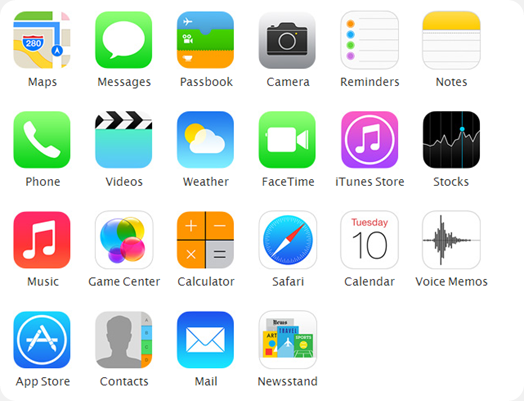
built in apps

In the Box:


  1. iPhone 5s with iOS 7 
  2. Apple EarPods with Remote and Mic 
  3. Lightning to USB Cable 
  4. USB Power Adapter 
  5. Documentation

Capacity & Price:

Price

Monday, 24 December 2012

Posted by Howzto
No comments | 08:05
iPad 3 and iPhone 5


The US retail giant Walmart is putting forth some competitive prices to lure Apple fans away from other retailers, including Apple’s own shops, by selling subsidized iPhone 5s at considerable discounts. Customers walking into the stores will be able to purchase the newest Apple iPhone for as little as $129 and the third-generation iPad for $399 (or $100 off) at Walmart. Note that the offer is only available in stores and not online.


This iPhone is with a two-year contract with AT&T, Verizon, or Sprint, but the iPad is free of any carrier subsidies. It is worth note that even with the $129 price, Apple’s iPhone 5 is still cheaper unlocked (at $649). Doing away with the two-year carrier contract will still save you more money in the long run.

Friday, 21 December 2012

Posted by Howzto
No comments | 08:56

INTRODUCTION
download-win
Team Viewer connects Between any PC or Server around the world.we can remote the another PC by using this software also we can share the files from one to another.Team viewer can be run by Windows,Mac,Android,iOS,Linux.While the main focus of the application is remote control of computers, collaboration and presentation features are included.You can Download this Software from Here Download Team Viewer

HOW TO USE
win-mainwindow
TeamViewer may be installed with an installation procedure, although the 'Quick Support' version will run without installation. To connect to another computer, TeamViewer has to be running on both machines. To install TeamViewer administrator access is required, but once installed it can be run by any user. When TeamViewer is started on a computer, it generates a partner ID and password (user-defined passwords are also supported). To establish a connection from a local client to a remote host machine, the local operator must communicate with the remote operator, request the ID and password, then enter these into the local TeamViewer. Now is connected now we can remote the other computer by sitting in front of your PC.To start an online meeting the presenter gives the Meeting ID to their participants. They join the meeting by using the TeamViewer

REMOTE CONTROL
win-opt-remote-control
Control computers remotely via the internet, as if you were sitting right in front of them. Whether you are providing spontaneous support, administering servers or working from your home office, TeamViewer lets you get the job done.You can solve the problems for our friends computer like installing software,problem fixing,coding etc.

Online Meetings, Team Work, Training And Presentations
 meeting
From sales presentations to training sessions and large international meetings with up to 25 participants, you have every option available to you. you invite the participants by adding the partner ID.The slide show Presentations can also Done .

Schedule And Organize Meetings
schedulemeeting
Do you regularly organize training sessions, presentations or online meetings? TeamViewer lets you schedule these events easily in advance. Make your job simple by sending invitations and automatically adding dates for meetings into your Outlook calendar. View all your scheduled meetings at a glance and never ever miss important appointments.

File Sharing
filetransfer
With file transfer, you can easily copy files or entire folders to and from the remote computer. You can also use the drag & drop feature for even greater convenience and speed.you can browse the partner PC and download the any Volume of Data without any disturbance the file sharing is very secured and no need worry.

TeamViewer Mobile
mobileapps
With TeamViewer apps for iPhone, iPad and Android, you and your colleagues or business partners can easily take part in meetings while on the road. Never miss important information again while maintaining your flexibility and mobility. Take part in a last-minute online meeting even when you are not at your desk.
Download TeamViewer Mobile

Security
Computer Security
TeamViewer uses RSA private/public key exchange (1024-bit) and AES (256-bit) session encoding.In the default configuration, TeamViewer uses one of the servers of TeamViewer.com to start the connection and the routing of traffic between the local client and the remote host machine. The software then determines how to establish a connection. In 70% of the cases after the handshake a direct connection via UDP or TCP is established, the other connections are routed through TeamViewer GmbH's router network (via TCP or http-tunneling).The key exchange also guarantees a full client-to-client data protection. This means that even our routing servers will not be able to read the data stream.
Access Protection
In addition to the Partner ID TeamViewer generates a session password that changes with every software start to provide additional security against unauthorized access to a remote system. Security relevant functions like file transfer require additional, manual confirmation of the remote partner. Also it is not possible to invisibly control a computer. For data protection reasons the person sitting on the remote computer has to be able to detect when someone is accessing the machine.  Even the Quick Support Custom Design tools are dynamically signed during generation!
I will Recommend This Software Because You Will Be Getting Big Benefit  and too This Is a Freeware Software Happy Connection....!!!  


Thursday, 20 December 2012

Posted by Howzto
No comments | 07:24
samsung apple nokia Apple And Samsung Beat Nokia As Largest Smartphone Makers

Since the Years going on there was Rise in mobile phone Products around the world.For 14 Year the NOKIA holds Top 1 Rank In the Mobile Phone product.But now it has changed. The SAMSUNG Inc set To seize the Mobile phone Market  in top rank.Global smartphone shipments are set to rise by 35.5 percent this year, while overall cellphone shipments will increase by approximately 1 percent. This rapid growth will propel 2012 smartphone penetration to 47 percent, up from 35 percent in 2011.


RISE OF SAMSUNG

The Samsung are now the best smart phone sellers in rank 1.In Olden Days the Samsung phones was running by BADA and WINDOWS OS.The biggest secret is the Samsung has changed to ANDROID Os to their most of their new phones.The Android is Best Operating System Now a Days And people are more likely to buy Android powered Phone.There are many Application,Entertainment And Fun in Android Os they are keeping upgrading .so every on are keep interesting on Android and the biggest advantage is the Android is maintained by GOOGLE Inc.The Samsung Introducing several upgraded and newly Parts and that also could help to Improve thus the Secret Behind the Raise Of SAMSUNG.

FALL OF NOKIA

In past Years Nokia is best Mobile Phone sellers among the wireless communications they had maintained 30% in the year 2011 but in 2012 they were in 24%.the reason behind this was OS.the Nokia phones was Operating in Symbian OS it Not all suitable for Now days they have Many Errors and not updated it fails to attract the users.The Windows OS is Just Okay.But the Quality of Nokia Phone are Very Excellent .Now I Wonder About the Quality Of Nokia they were maintaining Still Now.but they have concentrate in OS and Upgraded.


OTHERS ON RACE


Apple:
Apple was Nice Phone it has nice hardware,OS,Quality But Why Not Come Top 1 Because the Only thing is Cost.Apple phones Cost High.So Every One Cannot Buy.this will slow up their Rise.
HTC:
HTC was developing company and its competition was healthy with other company.so HTC also have much Capable to qualify to Top1.
LG:
LG is also a developing they have well talent to Qualify to Top 1 But the Main Thing is Hard Work!!!


Tuesday, 18 December 2012

Posted by Howzto
No comments | 08:28
Note Is Combination Of PHONE+TABLET.On 2012 August Samsung Electronics Announced their New Product SAMSUNG GALAXY NOTE II
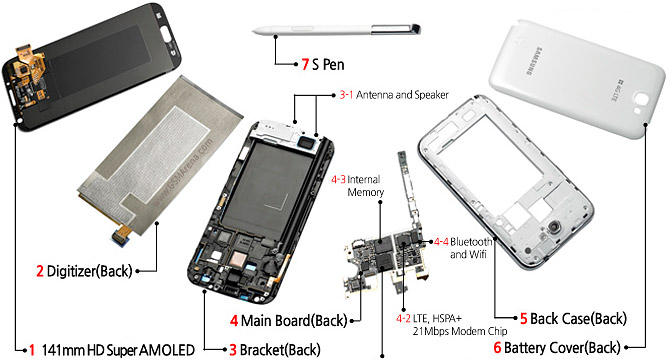
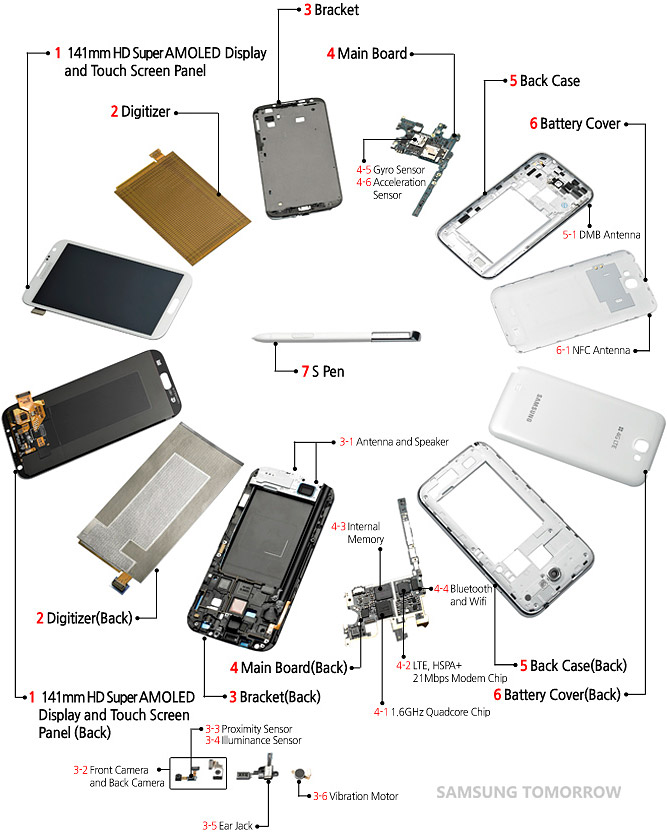
The Samsung Galaxy NoteII Was Best Smart Phone Ever.It Has High Margin Of Sale Up To Date And It Is Top In Search List.But It Cost Was Too High and Very Large To Carry.Though The Users Like To Buy the Product.You Wonder By Seeing The Internal Parts,Components and Degsin Of NoteII.
SPECIFICATIONS & DESIGN 
PARTS AND COMPONENTS

ABOUT ME

Hi this is Muthu. I am here to share the latest information around the world and to express my thoughts.you can also share interesting things which you Know.

SOCIAL MEDIA

RECENT COMMENTS